Linux Operating System
This guide explains how to install and configure WireGuard on Linux (deb-based) to connect to the Helium VPN Server.
Installation Steps
- Install WireGuard using the following command:
sudo apt install wireguard - Open a terminal and run the following command to bring up the tunnel:
sudo wg-quick up ./<CLIENT_FILE>
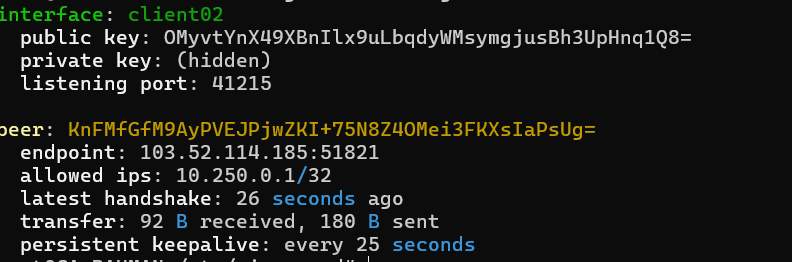
Enable IPv4 Forwarding
Enable IPv4 forwarding
Enable IPv4 Forwarding (Temporary):
To enable IPv4 forwarding temporarily (until the next reboot), run the following command:
sudo sysctl -w net.ipv4.ip_forward=1Enable IPv4 forwarding (Permanent):
To make the change persistent across reboots, you need to edit a configuration file, typically /etc/sysctl.conf or a file in /etc/sysctl.d/:
- Open the configuration file using a text editor, such as nano or vim:
sudo nano /etc/sysctl.conf - Add or uncomment the following line:
net.ipv4.ip_forward=1 - Save the file and exit the text editor
- Apply the changes using the following command:
sudo sysctl -p
After these steps, your Linux system will forward IPv4 packets, functioning as a router if configured with appropriate routing rules (e.g., using iptables).
- Open the configuration file using a text editor, such as nano or vim:
Accessing Targets on Different Servers
Accessing Targets on Different Servers within the Same Subnet
If the target application or server is hosted on a different server but still within the same subnet, the WireGuard Server must support packet forwarding and NAT.
Firewall Forwarding Rules
   iptables -A FORWARD -i wg0 -j ACCEPT
   iptables -A FORWARD -o wg0 -m state --state RELATED,ESTABLISHED -j ACCEPT
These rules allow traffic from the WireGuard interface (wg0) to reach the internal network and ensure return traffic is properly forwarded back to the client.
NAT (Masquerade) Configuration
iptables -t nat -A POSTROUTING -s 10.250.0.0/24 -o eth0 -j MASQUERADEThis ensures traffic originating from the WireGuard client subnet is translated correctly so responses from internal targets are routed back through the VPN tunnel.
Verification
- Ensure that your server can successfully PING the following destinations:
- Helium Server, based on the information provided in the Helium Cloud, as listed in the IP Address Whitelist section (https://www.helium.sh/account?menu=security)
- Helium VPN Server and port, as listed at https://www.helium.sh/vpn-access Ensure that the correct workspace is selected.
- VPN Server IP Address, which is 10.250.0.1